 Tweet
Tweet
I've just finished the new incarnation of GSHIConvert, Majestic Porter. The Serial Repeater Utility is finished, and several bugs/deficiencies have been remedied. You can grab Majestic Porter here:
http://gshi.org/downloads/majestic_porter.zip
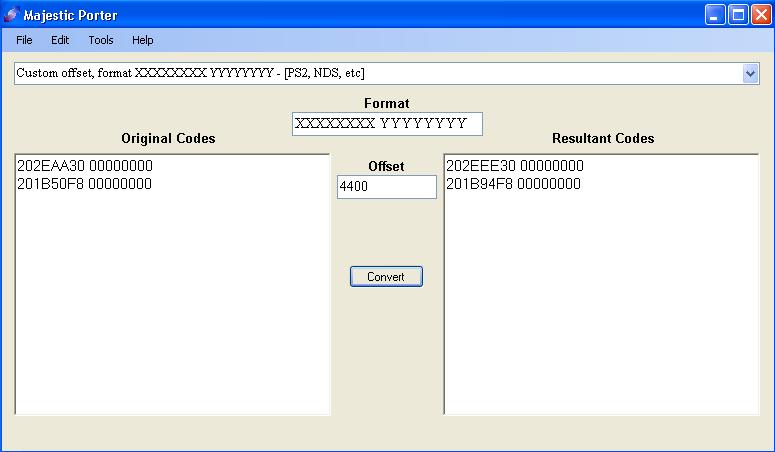
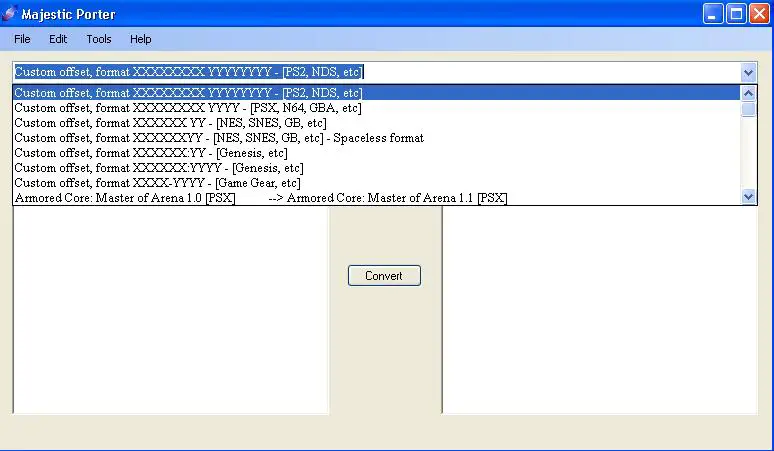
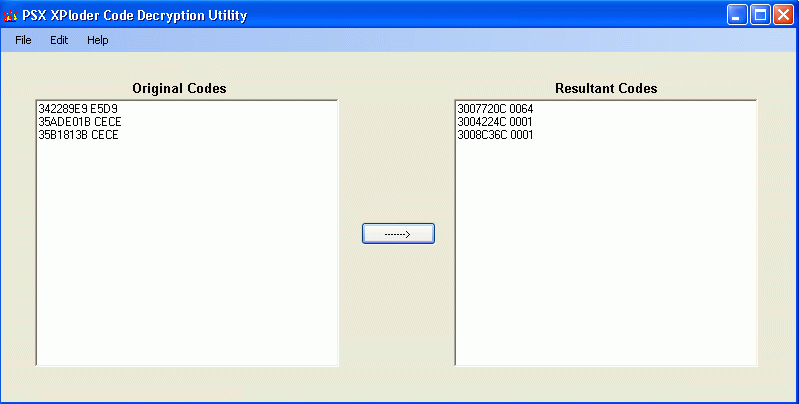
For a decent explanation of Majestic Porter, here's a copy and paste of the ReadMe, and a few screenshots:
______________________________________
Majestic Porter 2.5
Majestic Porter (previously known as GSHIConvert) will allow you to convert, or port, codes between different versions of the same game (eg, to convert codes for Game 1.0 to Game 1.1, or codes from the PAL version of Game to the NTSC version, and so forth). Currently, it supports codes in the format XXXXXXXX YYYY, where XXXXXXXX = address, and YYYY = value (hence, codes for PSX, N64, NDS, GBA [depending on cheat system], and anything else with that format will work). The app's name is a little strange, but it has three intentional meanings (and perhaps more unintentional ones, heh).
There is an option to use a custom offset of your choice, and a small list of games/versions to convert to/from. The list of preconfigured conversions will grow as more offsets are solved for. Feel free to submit an offset.
I've included a small calculator I built that works in hex and dec (two calculators, technically), and converts between the two. Keep in mind that the hex division function will omit remainders and round up or down accordingly, and that, until I'm un-lazy enough to fix it (which I have a general idea of how to do), hex numbers larger than 7FFFFFFF will convert to negative numbers in decimal. Believe it or not, this is actually normal behavior, considering the way I coded the calculator. For now, if you'd like to convert an address from hex to decimal, just omit the first two characters.
I've also included a utility I built to handle 50-type serial repeaters, with the ability to extrapolate from and condense to this format.
Unfortunately, in order to run Majestic Porter, you'll need to download Microsoft .NET 2.0, currently available here:
http://www.microsoft.com/downloads/d...displaylang=en
I'd include it, but, as you may know, the bastard is ~20MB
In any case, quite a few applications require the .NET Framework these days, so you might as well have it installed. So really, I'm doing you a favor
Shortcut Keys in Majestic Porter:
F1 - Open (Open a file containing a collection of codes you'd like to convert (heh, alliteration). Note that Majestic Porter is quite strict at the moment, and requires such a file to be in the format ExampleCodes.txt is in)
F2 - Save As... --Save the contents of Resultant Codes to a .doc file.
F5 - Convert Codes --Avoid the time-consuming process of clicking Convert, heh.
F7 - Clear All --Clear all fields, and reset the dropdown menu to default.
F10 - About --About Majestic Porter.
Alt+C - Calculator --Bring up the calculator.
Alt+S - Serial Repeater Utility --Bring up the Serial Repeater Utility.
Shortcut Keys in the Serial Repeater Utility:
F1 - Open (Open a file containing a collection of codes you'd like to extrapolate/condense. Note that Majestic Porter and its sub-apps are quite strict at the moment, and require such a file to be in the format ExampleCodes.txt is in)
F2 - Save As... --Save the contents of Resultant Codes to a .doc file.
F5 - Perform Operation --Avoid the time-consuming process of clicking the button, heh.
F7 - Clear All --Clear all fields.
F10 - About --About Majestic Porter Serial Repeater Utility.
Note: To make a subtractive offset in Majestic Porter, simply append a "-" (without the quotation marks) to the beginning of your offset.
____________________________________________
Improvements in later versions will include:
- The addition of many more games (as noted)
- Auto-detection of codes within other text, so a user can paste a code with a name and description, which Majestic Porter will filter. It will then perform offset operations on the addresses, and copy the entire contents of Original Codes (everything the user pasted), with the newly-incremented addresses in place of the originals. In this way, one could convert entire pages of codes without having to do so much copying and pasting.
- Support for other code formats (NES PAR, etc)
- Support for custom formats
And probably...
- Anything else that comes to mind which might be useful. However, if you've seen GSHIConvert 1.9 or earlier, you know that this app's come a long way, heh.
Current known issues:
*This isn't really an issue, since Majestic Porter could be used for any code in the XXXXXXXX YYYY format, and thus needs to be free to perform operations as the user wishes, but...if included in Original Codes, GSPro Universal Jokers, Universal All-Codes-On, Universal All-Codes-Off, Universal Delay All Codes (D4, D5, D6, & C1; not commonly used), and serial repeaters (50-type condensers), will be offset, and rendered inoperable. I've added a popup message to warn of this, but still allowed such lines of code to be offset, in case of special circumstances. That, and serial repeaters can be extrapolated using the Serial Repeater Utility built-in to Majestic Porter, offset, then recondensed.
*If the user enters anything other than hexadecimal characters (0-9, A-F) in Original Codes (or anything but hex characters or a minus symbol in Offset), the output will be destroyed. Hence, the popup message you'll get, noting that something's gone terribly wrong.
If you have a question, complaint, comment, suggestion, request, bug to report, or just want to get in touch with me, send me an email, or make a post at the GSHI forums (or drop by GSHI Chat, for that matter).
-Lazy Bastard ([email protected])
http://GSHI.org
____________________________________________


http://gshi.org/downloads/majestic_porter.zip
For a decent explanation of Majestic Porter, here's a copy and paste of the ReadMe, and a few screenshots:
______________________________________
Majestic Porter 2.5
Majestic Porter (previously known as GSHIConvert) will allow you to convert, or port, codes between different versions of the same game (eg, to convert codes for Game 1.0 to Game 1.1, or codes from the PAL version of Game to the NTSC version, and so forth). Currently, it supports codes in the format XXXXXXXX YYYY, where XXXXXXXX = address, and YYYY = value (hence, codes for PSX, N64, NDS, GBA [depending on cheat system], and anything else with that format will work). The app's name is a little strange, but it has three intentional meanings (and perhaps more unintentional ones, heh).
There is an option to use a custom offset of your choice, and a small list of games/versions to convert to/from. The list of preconfigured conversions will grow as more offsets are solved for. Feel free to submit an offset.
I've included a small calculator I built that works in hex and dec (two calculators, technically), and converts between the two. Keep in mind that the hex division function will omit remainders and round up or down accordingly, and that, until I'm un-lazy enough to fix it (which I have a general idea of how to do), hex numbers larger than 7FFFFFFF will convert to negative numbers in decimal. Believe it or not, this is actually normal behavior, considering the way I coded the calculator. For now, if you'd like to convert an address from hex to decimal, just omit the first two characters.
I've also included a utility I built to handle 50-type serial repeaters, with the ability to extrapolate from and condense to this format.
Unfortunately, in order to run Majestic Porter, you'll need to download Microsoft .NET 2.0, currently available here:
http://www.microsoft.com/downloads/d...displaylang=en
I'd include it, but, as you may know, the bastard is ~20MB
In any case, quite a few applications require the .NET Framework these days, so you might as well have it installed. So really, I'm doing you a favor
Shortcut Keys in Majestic Porter:
F1 - Open (Open a file containing a collection of codes you'd like to convert (heh, alliteration). Note that Majestic Porter is quite strict at the moment, and requires such a file to be in the format ExampleCodes.txt is in)
F2 - Save As... --Save the contents of Resultant Codes to a .doc file.
F5 - Convert Codes --Avoid the time-consuming process of clicking Convert, heh.
F7 - Clear All --Clear all fields, and reset the dropdown menu to default.
F10 - About --About Majestic Porter.
Alt+C - Calculator --Bring up the calculator.
Alt+S - Serial Repeater Utility --Bring up the Serial Repeater Utility.
Shortcut Keys in the Serial Repeater Utility:
F1 - Open (Open a file containing a collection of codes you'd like to extrapolate/condense. Note that Majestic Porter and its sub-apps are quite strict at the moment, and require such a file to be in the format ExampleCodes.txt is in)
F2 - Save As... --Save the contents of Resultant Codes to a .doc file.
F5 - Perform Operation --Avoid the time-consuming process of clicking the button, heh.
F7 - Clear All --Clear all fields.
F10 - About --About Majestic Porter Serial Repeater Utility.
Note: To make a subtractive offset in Majestic Porter, simply append a "-" (without the quotation marks) to the beginning of your offset.
____________________________________________
Improvements in later versions will include:
- The addition of many more games (as noted)
- Auto-detection of codes within other text, so a user can paste a code with a name and description, which Majestic Porter will filter. It will then perform offset operations on the addresses, and copy the entire contents of Original Codes (everything the user pasted), with the newly-incremented addresses in place of the originals. In this way, one could convert entire pages of codes without having to do so much copying and pasting.
- Support for other code formats (NES PAR, etc)
- Support for custom formats
And probably...
- Anything else that comes to mind which might be useful. However, if you've seen GSHIConvert 1.9 or earlier, you know that this app's come a long way, heh.
Current known issues:
*This isn't really an issue, since Majestic Porter could be used for any code in the XXXXXXXX YYYY format, and thus needs to be free to perform operations as the user wishes, but...if included in Original Codes, GSPro Universal Jokers, Universal All-Codes-On, Universal All-Codes-Off, Universal Delay All Codes (D4, D5, D6, & C1; not commonly used), and serial repeaters (50-type condensers), will be offset, and rendered inoperable. I've added a popup message to warn of this, but still allowed such lines of code to be offset, in case of special circumstances. That, and serial repeaters can be extrapolated using the Serial Repeater Utility built-in to Majestic Porter, offset, then recondensed.
*If the user enters anything other than hexadecimal characters (0-9, A-F) in Original Codes (or anything but hex characters or a minus symbol in Offset), the output will be destroyed. Hence, the popup message you'll get, noting that something's gone terribly wrong.
If you have a question, complaint, comment, suggestion, request, bug to report, or just want to get in touch with me, send me an email, or make a post at the GSHI forums (or drop by GSHI Chat, for that matter).
-Lazy Bastard ([email protected])
http://GSHI.org
____________________________________________



Comment