Announcement

Collapse
No announcement yet.

Problem with ArtMoney 7.39.2

Collapse
X
 
  • Filter
  • Time
  • Show
Clear All
new posts

  • Problem with ArtMoney 7.39.2

    Hello. I have a problem with ArtMoney 7.39.2. With that program I made a table for a game (I had Windows XP). The table was always working (It had pointers). Now, I reinstalled the Windows, so I have now Windows 7. When I open game and choose table, it doesn't search anything which is for game, my tables are just "broken". Can I fix it? I would like to play those games with tables again, but I can't. Please, help.

    Thanks in advance.

  • #2
    Make sure your antivirus isn't interfering with it and try a new install of the program, I use artmoney all the time on windows 7 with no issues and it would help to know what version Windows it is like x64 or x86 (32bit).
    Spoiler Alert! Click to view...

    THE BAD GUY!!!!!!

    Comment


    • #3
      I have version x86. Well, I tried to install many different versions of ArtMoney to try to launch it, but every didn't help. My ArtMoney opens normally, it searches normally, but my table is just "broken". I didn't change the version of game, I didn't uninstall it and install again, I didn't do anything with that. Well, I just installed new verison of AM but my table still doesn't work.

      Comment


      • #4
        //Jacusiek try ArtMoney v7.40.4
        ArtMoney emulator options: How to make
        Latest updates

        Comment


        • #5
          Originally posted by iddqd View Post
          //Jacusiek try ArtMoney v7.40.4
          Well, I just tried that one and it still doesn't work.

          Comment


          • #6
            //Jacusiek You had to use Pointers with "module addressing". Which game?
            ArtMoney emulator options: How to make
            Latest updates

            Comment


            • #7
              Originally posted by iddqd View Post
              //Jacusiek You had to use Pointers with "module addressing". Which game?
              Maybe, but I don't know what is "module addressing". I made that table for Spellforce Gold Edition version 1.52.61408 (game with all possible patches). On another forum I sent a link to this table and people, who used that, said that it works, so I don't know why it doesn't work at my Spellforce. Anyway, here is the link to download that table: http://www.speedyshare.com/kQrMD/Spe...ld-Edition.amt
              P.S. I'm from Poland so I made that table for Polish verison of game, so I don't know how will You check if it is right or not.
              Last edited by Jacusiek; 02-09-2013, 11:50:52 AM.

              Comment


              • #8
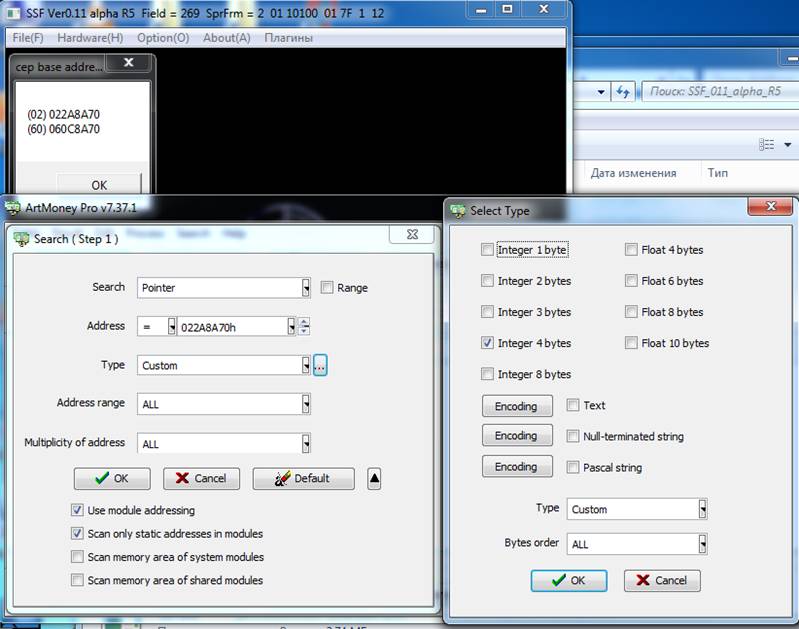
                //Jacusiek note “Use module addressing” and “Scan only static addressess in modules” when searching (see bottom of the screenshot):
                Last edited by iddqd; 02-09-2013, 12:14:38 PM. Reason: edit
                ArtMoney emulator options: How to make
                Latest updates

                Comment


                • #9
                  So, In my example, I have bad pointer "Armor" which is:
                  0013199C and goes to address: 0032005F (+44). Now, to repair it, I have to search it all I made from the beginning or what should I do, because I still don't understand at all. I found the correct address of my "Armor", and how to make pointer, which will be working for sure?

                  @Edit: I tried to do that:
                  1. I searched correct address for my "Armor"
                  2. I pressed "Search", set pointer, checked those two first boxes in Address value and put my address I searched in 1st step.
                  3. It didn't find anything.

                  I know I'm doing something wrong, but I don't know what.
                  Last edited by Jacusiek; 02-09-2013, 01:28:03 PM.

                  Comment


                  • #10
                    Sorry for making double post but I still don't understand how to do it.

                    Comment

                    Working...
                    X