 Tweet
Tweet
My EverDrive 64 finally showed up yesterday, which was perfect timing for my birthday. Today I finally got a chance to play around with it and test out one of the accessories I had bought for the N64, the Transfer Pak. I picked it up for a mere four dollars because it was being sold as broken/as is because it was untested by the seller. The reason I bought it was because of what I read from Wikipedia about the two Pokémon Stadium games. For example, with the first Pokémon Stadium game: At the GB Tower, the player can play Pokémon Red, Blue, or Yellow on the Nintendo 64 using the Transfer Pak.
I don't own any of those Game Boy games, but do own a flash cartridge for Game Boy. After testing it out with Pokémon Blue (the only Pokémon game I've ever really played), I wondered if I would be able to make it boot any other Game Boy games.
I first picked Wario Land II to test out because it was the same size ROM as Pokémon Blue as well as the same cartridge type. Just by changing the title of the game in the header to match Pokémon Blue and then fixing the checksum, I was able to get it to boot:
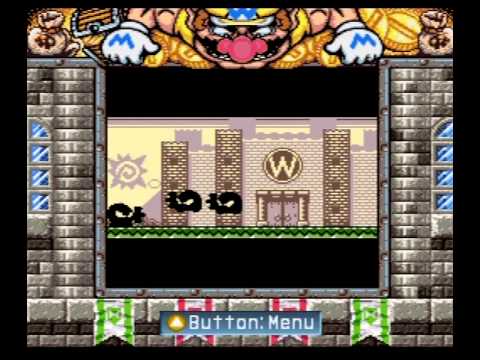
Awesome, even the Super Game Boy features were working! But unfortunately, after the intro it errors out when the N64 tries to save to the cartridge.
As a second test, I tried the non Super Game Boy game Super Mario Land. Had to do quite a few modifications to get this one working, the usual title + checksum modification wasn't enough. After changing the Destination Code (0x14A=01 for non Japanese) the game finally attempted to boot, but that still was not enough. Finally, I changed the cartridge type settings in the header as well as padded the game to 1MB, and it finally also booted up.
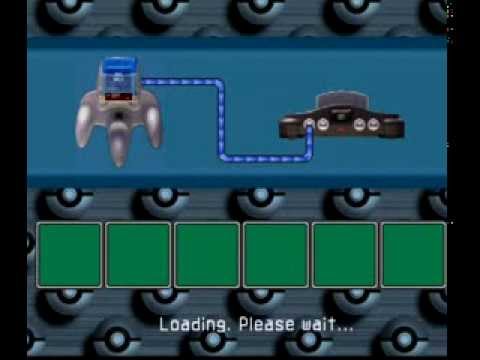
It soon gave an error about saving, just like Wario did. But, after simply removing the Game Boy cartridge from the Transfer Pak and re-inserting it, the game proceeded to play!
And that's about as far as my testing has came.
Still haven't tried a Game Boy Color game, nor have I tested out the potentially updated emulator inside the N64 game Pokémon Stadium 2.
I don't own any of those Game Boy games, but do own a flash cartridge for Game Boy. After testing it out with Pokémon Blue (the only Pokémon game I've ever really played), I wondered if I would be able to make it boot any other Game Boy games.
I first picked Wario Land II to test out because it was the same size ROM as Pokémon Blue as well as the same cartridge type. Just by changing the title of the game in the header to match Pokémon Blue and then fixing the checksum, I was able to get it to boot:
Awesome, even the Super Game Boy features were working! But unfortunately, after the intro it errors out when the N64 tries to save to the cartridge.
As a second test, I tried the non Super Game Boy game Super Mario Land. Had to do quite a few modifications to get this one working, the usual title + checksum modification wasn't enough. After changing the Destination Code (0x14A=01 for non Japanese) the game finally attempted to boot, but that still was not enough. Finally, I changed the cartridge type settings in the header as well as padded the game to 1MB, and it finally also booted up.
It soon gave an error about saving, just like Wario did. But, after simply removing the Game Boy cartridge from the Transfer Pak and re-inserting it, the game proceeded to play!
And that's about as far as my testing has came.
Still haven't tried a Game Boy Color game, nor have I tested out the potentially updated emulator inside the N64 game Pokémon Stadium 2.
 , anyho hapy bday mez
 dood
dood
Comment