 Tweet
Tweet
By Reprep
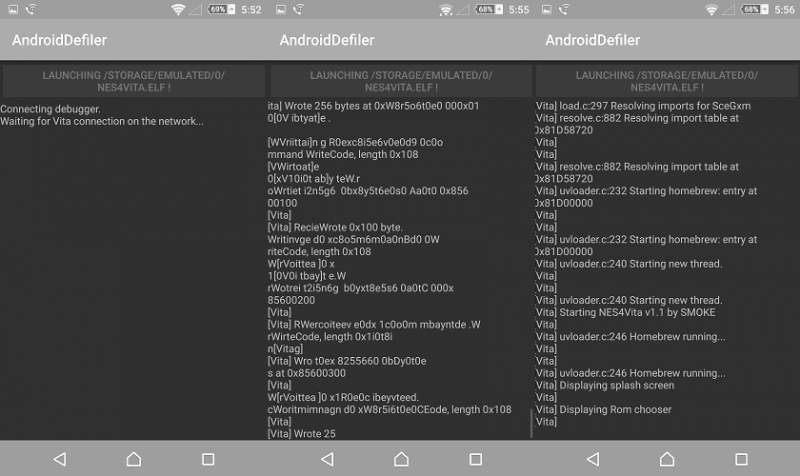
Vita developer frangarcj released Rejuvenate-0.3.3 Android. This means you are no longer restricted to be connected to a Windows PC via USB or wireless for your Vita homebrew need. You can have your favorite Rejuvenate homebrews wherever you go with the help of your Android phone/tablet.
About two weeks ago, we told you about a possible upcoming release of VitaDefiler for Android. Thanks to frangarcj, it is now a reality.
This means so much for the scene as it gives back Vita the portability it needs. Even though Rejuvenate is one of the best things that happened to Vita, necessity to be connected to a Windows PC (via USB or wireless) really limits the portability.
This is where Rejuvenate-0.3.3 Android comes into play. With it, you can connect both your Vita and your android phone/tablet to an existing WI-fi spot and shoot your Rejuvenate homebrew. If there is no WI-fi around, don’t worry, you can just create a hotspot on your android phone/tablet and have your vita connected to that hotspot and voila, you are ready to rock.

Thanks to frangarcj and other devs helping him for giving Rejuvenate the portability it needs.
Source and downloads via GitHub
Vita developer frangarcj released Rejuvenate-0.3.3 Android. This means you are no longer restricted to be connected to a Windows PC via USB or wireless for your Vita homebrew need. You can have your favorite Rejuvenate homebrews wherever you go with the help of your Android phone/tablet.
About two weeks ago, we told you about a possible upcoming release of VitaDefiler for Android. Thanks to frangarcj, it is now a reality.
This means so much for the scene as it gives back Vita the portability it needs. Even though Rejuvenate is one of the best things that happened to Vita, necessity to be connected to a Windows PC (via USB or wireless) really limits the portability.
This is where Rejuvenate-0.3.3 Android comes into play. With it, you can connect both your Vita and your android phone/tablet to an existing WI-fi spot and shoot your Rejuvenate homebrew. If there is no WI-fi around, don’t worry, you can just create a hotspot on your android phone/tablet and have your vita connected to that hotspot and voila, you are ready to rock.
Thanks to frangarcj and other devs helping him for giving Rejuvenate the portability it needs.
Source and downloads via GitHub


Comment